How to Turn Everyday Photos Into Engaging Short Videos
From a favorite travel snapshot to a quiet moment at home, everyday photos can become short videos that bring memories and ideas to life.
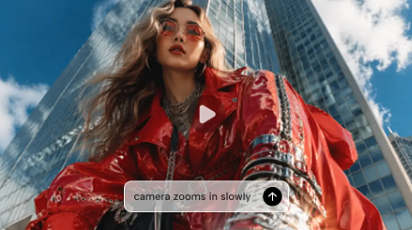
A photograph can capture a meaningful moment; a little movement can give viewers time to notice it. Whether you want to share a travel memory, introduce a creative project or make a social post feel more alive, an ai video generator such as Dreamina can help you explore motion from a still image. The key is deciding what should move before asking a tool to animate everything.
A successful photo-to-video clip does not need a dramatic transformation. A curtain shifting in the breeze, sunlight moving across a table or a slow change in viewpoint can be enough to give a picture a sense of time. This guide walks through choosing a photograph, writing a useful motion prompt and assembling a few short clips into a sequence.
Start with a photo whose subject is easy to identify. If the image contains a coffee cup, an open book and a window, decide which one matters most. A clear focal point makes it easier to judge whether the generated motion supports the image or draws attention away from it.
Look at the edges too. A person cropped tightly at the elbows may be harder to animate naturally than a portrait with space around their arms. A landscape with visible foreground and background gives you more options for suggesting depth. If the original is soft or heavily compressed, inspect the output on the screen where the finished video will appear.
Consider what the photograph does not show. A single frame cannot tell the model exactly what lies behind an object or how a person looked a moment later. If the intended shot requires revealing a large unseen area, the output may invent it. You can avoid that problem by choosing a restrained movement or using another image as a separate shot.
Choose a photograph you are permitted to upload and publish. When it includes someone else, consider whether they have agreed to the intended use, especially if the video will be shared publicly.
Decide what should move
Motion in a photo-based clip usually comes from three places: the subject, the environment or the camera. These can work together, but begin with one main movement.
Subject movement changes the person or object at the centre of the image. A person might turn a page, a hand might lift a cup, or a dog might look towards a window. Small actions tend to be easier to evaluate because you know what the shot is supposed to show.
Environmental movement adds activity around a largely stable subject. Leaves can sway, a curtain can move, reflections can shift or steam can rise. This works well when the photograph already has a strong composition and you want to preserve it.
Camera movement changes the viewer’s point of view. A slow push-in can direct attention to a subject; a gentle pullback can reveal the surrounding scene. A camera move does not need to imitate a drone or a complex tracking shot to make a still image feel alive.
Choose the movement that fits the moment. A quiet breakfast photo may benefit from a subtle environmental change. A photo of someone holding a travel journal might invite a small hand movement. If both the subject and camera move rapidly, the viewer may struggle to see what changed.
Write a prompt that builds on the photo
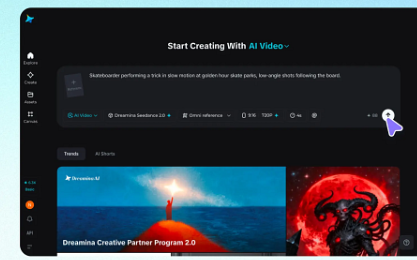
When starting with a photo, you do not need to redescribe every object. Explain the movement you want, the pace and any details that should remain stable. A useful starting structure is: subject or element + action + pace + camera direction + what to preserve.
Imagine a photograph of a cup of coffee, an open book and a curtain beside a window. You could explore three different ideas from the same source:
Environmental movement: “A thin wisp of steam rises from the coffee while the curtain moves gently in a light breeze. Keep the cup and book still. Warm morning light, steady camera, subtle natural movement.”
Camera movement: “Slowly move the camera closer to the coffee cup and open book. Preserve the arrangement and the soft window light. The objects remain still; movement is limited to the camera.”
Subject movement: “A hand enters the frame and slowly turns one page of the open book. Keep the coffee cup and table arrangement consistent. Gentle movement, steady camera.”
Each prompt asks for a different result. The first creates atmosphere, the second directs attention, and the third introduces an action. Try the version that serves your message instead of choosing the most elaborate one.
Avoid vague instructions such as “make it cinematic” without describing what you want to see. You can still ask for a cinematic mood, but pair it with a concrete instruction: “slow push-in, soft evening light, subject remains centred.” The action gives you something useful to review.
Control camera movement without losing the subject
A camera prompt is more helpful when it describes direction and speed. “Slowly move closer to the subject” communicates more than “dynamic camera.” If the scene needs to reveal a detail, say which detail should become visible and where it is in the image.
For example, a travel photo of a café table may include a postcard in the foreground and a street in the background. A subtle push towards the postcard can give the viewer a reason to notice it. A wide sideways move might instead invent buildings outside the original frame and distract from the memory you wanted to share.
If the subject disappears or becomes distorted, simplify. Ask for a slower move, a steadier frame or less change in perspective. You can also choose a photograph with more space around the subject. A good result is one where the movement makes the original idea clearer.
Create three useful clips from one photo
You can build a short sequence from a single photograph without making every shot look identical. Give each clip a role: establish the scene, draw attention to a detail and provide a quiet ending.
For the breakfast image, the first clip could hold the wide view while the curtain moves. The second could gently move closer to the book. The third could return to a quieter composition with steam rising from the cup. The change is modest, but the viewer has a visual path through the scene.
Keep the references consistent when the workflow supports them. Compare the cup shape, book position and lighting across selected clips. If a detail changes noticeably, try a less ambitious variation or cut to a separate photograph rather than implying that the changed object is the same.
Do not assume that every variation must show a different action. A still pause between moving shots can improve pacing and give viewers time to read a caption.
Turn several photographs into a short story
When you have more than one photo, start with the order rather than generating all of them immediately. A simple travel sequence might show a station, a view through a window, a café table and an evening street. Each image can represent a different moment in the day.
Give each photo a reason to appear. The station introduces the journey; the window suggests movement; the café offers a pause; the street closes the day. The video will feel more cohesive if the clips follow a clear progression rather than switching between unrelated effects.
Use short motion notes before generating: “train lights pass outside,” “curtain moves near the café table,” or “pedestrians pass in the distance.” If a still photograph already communicates the moment well, it can remain still. Movement is a creative option, not a requirement for every image.
When editing, vary the pace. A slightly longer first shot can establish a location, while a close detail can be shorter. Leave enough time for the viewer to understand each image before moving on. If a caption is important, keep it on screen long enough to read comfortably.
Fix common problems
If a face changes, reduce the requested movement and compare the output with the original. A subtle turn or change in expression may work better than asking a person to perform several actions. If the person is important to the project, use a clearer source photo and review the whole clip before sharing.
If an object changes shape, simplify the action around it. A hand moving near a cup can be harder to preserve than steam rising above it. Try separating the action into another shot or keep the original object still.
If the background becomes distracting, specify which element should move and which should remain stable. “The curtain moves; the furniture and cup remain still” is more useful than “everything comes to life.” If the result still drifts, choose the clearest part of the clip or return to a still image.
If the clip looks too fast, describe a slower action and avoid combining a large camera move with subject movement. You can adjust timing in an editor, but slowing an already confused action will not necessarily make it clearer.
Add text and sound with a purpose
A caption should add context that the photo cannot provide. A location, a short reflection or the reason a moment mattered can be more useful than describing an object already visible. Keep the words brief enough to read over the footage.
Sound can support the setting: a quiet room tone, distant street noise or soft music may help create a mood. Use material you have permission to include. If there is narration, add accurate captions and check that they match the final audio.
Watch without sound as well. The sequence should still communicate its basic idea, and text should not cover the main subject or fall beneath platform controls. Preview the export on a phone before publishing.
Keep the memory recognisable
A moving version of a photograph is an interpretation of that image. Generated details can change, and an imagined movement should not be presented as a recording of an event that actually happened. If factual accuracy or a person’s real expression is central, the original photograph may be the stronger choice.
Begin with one image, choose one movement and review the complete result. Once you know what the motion adds, you can develop more clips and arrange them into a sequence that feels intentional rather than animated for its own sake.