Linear vs Tactile Switches: Which Mechanical Keyboard Switch Is Better?
Choosing the right mechanical keyboard switch can make a noticeable difference in how your keyboard feels during everyday use. Whether you spend hours typing documents, playing competitive games, or switching between work and entertainment, the type of switch beneath each key affects your overall experience.
Among the most popular mechanical keyboard switches are linear and tactile switches. Both offer distinct typing characteristics, and neither is automatically better for everyone.
Linear switches are known for their smooth, consistent keystrokes without a noticeable tactile bump. Tactile switches, on the other hand, provide physical feedback during keypresses, helping users feel when a key reaches its actuation point.
So, which one should you choose?
In this guide, we’ll explain how linear and tactile switches work, compare their typing feel, sound, and performance, and explore which type may suit different users and situations.
What Are Linear and Tactile Keyboard Switches?
Mechanical keyboard switches are individual mechanisms installed beneath the keycaps. Each switch registers a keystroke when its internal mechanism reaches a specific actuation point.
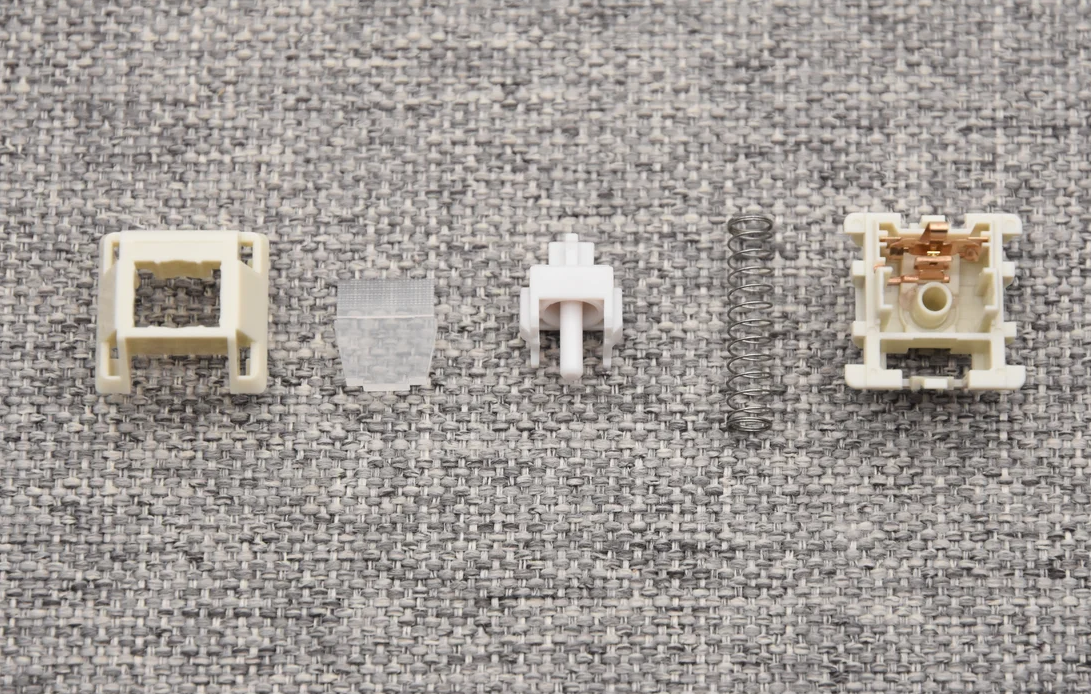
Although linear and tactile switches share similar basic components, their internal designs create different typing experiences.
What Are Linear Switches?
Linear switches are mechanical switches with a smooth and consistent movement from the top of the keystroke to the bottom. They do not have a noticeable tactile bump or click during actuation.
When you press a key equipped with a linear switch, the stem moves downward against the spring without a distinct resistance change. Once the stem reaches the actuation point, the keyboard registers the input.
This straightforward movement is one reason linear keyboard switches are popular among gamers and mechanical keyboard enthusiasts.
Common examples include Cherry MX Red, Gateron Red, and various Yellow and Black linear switch models.
Depending on the model, linear switches can have different spring weights, actuation distances, housing materials, and sound characteristics. Some feel light and effortless, while others require more force and provide a firmer bottom-out experience.
What Are Tactile Switches?
Tactile switches are designed to provide a noticeable physical bump during a keypress.
As you press a tactile switch, you feel a small increase or change in resistance around the actuation point. This feedback allows you to recognize that the keystroke has registered without necessarily pressing the key all the way down.
For people who spend much of their day typing, this physical feedback can make each keystroke feel more deliberate.
Popular examples include Cherry MX Brown, Gateron Brown, and Boba U4T switches.
Tactile switches vary considerably in their feedback. Some have a subtle bump, while others offer a stronger and more pronounced tactile response.
How Do Their Internal Mechanisms Differ?
The main difference is the shape and design of the switch stem and the way it interacts with the internal contact mechanism.
In a linear switch, the stem travels downward smoothly, creating relatively consistent resistance throughout the keystroke.
In a tactile switch, the stem and internal leaf mechanism create a noticeable resistance change during movement. This produces the tactile bump that users feel.
Both types generally use a spring to return the key to its original position after release.
The following table summarizes their basic characteristics.
| Feature | Linear Switches | Tactile Switches |
| Keystroke movement | Smooth and consistent | Noticeable tactile bump |
| Physical feedback | No pronounced bump | Feedback during actuation |
| Audible click | Usually no intentional click | Usually no intentional click |
| Typing experience | Smooth and uninterrupted | More feedback-oriented |
| Common examples | Cherry MX Red, Gateron Red | Cherry MX Brown, Boba U4T |
| Common users | Gamers and smooth-typing enthusiasts | Typists and feedback-oriented users |
What Are the Main Differences Between Linear and Tactile Switches?
Although both switch types are widely used in mechanical keyboards, their differences become more noticeable during extended use.
Let’s compare the four factors that matter most when choosing between them.
Typing Feel and Feedback
The most obvious difference is how each switch feels under your fingers.
Linear switches provide a consistent downward movement without a pronounced tactile event. This makes them appealing to users who prefer smooth keystrokes and minimal interruptions.
For example, imagine playing a fast-paced game where you repeatedly press movement keys such as W, A, S, and D. A linear switch offers a consistent feel each time you press and release a key.
Tactile switches provide a different experience. Their noticeable bump gives your fingers additional physical feedback during each keystroke.
This can be helpful when typing emails, writing reports, or entering information into spreadsheets. Some users appreciate being able to feel the actuation point rather than relying entirely on visual feedback.
However, typing comfort is subjective. Some people find tactile feedback helpful, while others prefer the smoother movement of linear switches.
Sound Levels and Acoustic Characteristics
Sound is another important consideration, especially if you use your keyboard in an office, shared workspace, or bedroom.
Linear switches generally lack the intentional click mechanism found in clicky switches. As a result, many linear models can produce a relatively quiet typing experience.
However, this does not mean every linear switch is silent.
The sound of a mechanical keyboard depends on several factors, including:
Switch housing and stem materials.
Spring design and lubrication.
Keyboard case construction.
Plate material and internal foam.
Keycap material and thickness.
Whether the key bottoms out or returns with a noticeable impact.
Tactile switches can also produce relatively quiet sound profiles, particularly models designed with softer feedback.
If noise reduction is your main priority, consider silent linear or silent tactile switches. These models use additional dampening components to reduce impact noise during keypresses.
It’s also worth remembering that the same switch can sound different in two keyboard builds. A switch that sounds deep in one aluminum keyboard may sound brighter in a plastic case.
Actuation Force and Travel Distance
Actuation force refers to the amount of force required for a switch to register a keystroke. Travel distance describes how far the stem moves before actuation or before reaching the bottom of its movement.
These measurements are important because they influence how light, heavy, or responsive a keyboard feels.
For a specific reference point, the CHERRY MX2A Red has a 45 cN operating force and 2.0 mm pre-travel according to CHERRY. The figures describe that model only; tactile-switch specifications should be checked model by model.
However, not all linear switches share the same specifications.
Some require lighter pressure, while others have heavier springs that provide more resistance. Tactile switches also come in different force ranges, depending on their intended typing experience.
When comparing switches, pay attention to these specifications:
Initial force: The force needed to begin moving the switch.
Actuation force: The force required to register a keypress.
Bottom-out force: The force experienced when the switch reaches the end of its travel.
Pre-travel: The distance the stem moves before actuation.
Total travel: The complete distance the stem can move.
Don’t choose a switch based on actuation force alone. Your typing habits and preferred resistance level are equally important.
Typing Speed and Accuracy
Do Linear or Tactile Switches Improve Typing Speed and Accuracy?
Neither switch type guarantees better speed or accuracy. The switch mechanism changes feedback, but practice, spring weight, key travel, keyboard electronics, and personal preference also influence performance.
Linear switches can feel responsive because they provide uninterrupted movement without a tactile bump. Some gamers enjoy this consistency when performing repeated actions or making rapid inputs.
However, actual gaming performance also depends on the keyboard’s electronics, switch actuation characteristics, software settings, and the user’s reaction time.
Some typists find that a tactile bump helps them recognize a keypress, while others find uninterrupted linear movement easier to control. Compare error rates and comfort in the same keyboard instead of treating either preference as universal.
There is no universal evidence that one mechanical switch type guarantees faster typing or fewer mistakes.
The best approach is to compare both types using the same keyboard layout and a similar spring weight, then see which one feels more natural.
What Are the Pros and Cons of Linear vs Tactile Switches?
Both switch types have advantages and limitations. Understanding these differences can help you avoid choosing a switch based only on popularity.
Advantages and Disadvantages of Linear Switches
Advantages:
Smooth keystroke movement without a noticeable tactile bump.
Consistent feel across repeated keypresses.
Suitable for users who prefer uninterrupted key movement.
Many models are available with different spring weights and travel characteristics.
A good choice for people who enjoy fast-paced gaming and smooth typing.
Disadvantages:
No pronounced tactile feedback to indicate actuation.
Some users may find it difficult to adjust if they prefer physical feedback.
Light linear switches may cause accidental keypresses for users accustomed to heavier switches.
Standard linear switches are not necessarily quiet or silent.
Advantages and Disadvantages of Tactile Switches
Advantages:
Provides physical feedback during keypresses.
Helps users recognize the actuation point through touch.
Offers a more feedback-oriented typing experience.
Available in different levels of tactile intensity.
Disadvantages:
The tactile bump may feel less smooth to users who prefer uninterrupted movement.
Stronger tactile switches may require adjustment for some users.
Feedback characteristics vary significantly between models.
They are not automatically quieter or more accurate than linear switches.
Which Switch Type Is Better for Different Uses?
Your daily activities are often more important than general switch rankings. A switch that works well for gaming may not be your first choice for long typing sessions.
Which Is Better for Gaming?
Linear switches are a popular choice for gaming, especially among players who prefer smooth and consistent keypresses.
In competitive games, players often repeatedly press movement, ability, and interaction keys. Linear switches provide a consistent movement pattern that some gamers find comfortable for these actions.
For repeated movement keys in FPS games, the uninterrupted feel of a linear switch may be comfortable. However, that does not establish a universal reaction-time advantage over tactile switches.
Some linear switches also feature shorter actuation distances, which can be useful for users who prefer their inputs to register earlier in the keypress.
However, a shorter actuation distance does not automatically make someone a better player. Gaming performance depends on many factors, including practice, reaction time, keyboard latency, and personal preferences.
Practical choice: try linear switches if you prefer smooth repeated presses; try tactile switches if you want a recognizable bump. Compare spring force and actuation point within each category before deciding.
Which Is Better for Office Work?
For office work, both linear and tactile switches can be suitable.
If you regularly work in spreadsheets, write emails, or handle administrative tasks, tactile switches may appeal to you because of their physical feedback.
On the other hand, linear switches can be comfortable for users who prefer a smooth and consistent typing experience throughout the day.
Noise should also be considered.
Where noise matters, compare silent linear and silent tactile designs rather than assuming a regular linear switch will be unobtrusive. Case construction and stabilizers also contribute to audible noise.
Recommendation: Choose tactile switches if you enjoy noticeable feedback while typing, or consider silent linear switches if you prefer smooth movement with reduced typing noise.
Which Is Better for Long Typing Sessions?
A long typing session is best evaluated by the combination of spring weight, rest position, typing pressure, and whether you find a tactile bump helpful or distracting.
Some users prefer linear switches because their consistent movement feels comfortable over extended periods. Others find tactile feedback useful because it helps them recognize each keypress.
Spring weight is particularly important here.
A very heavy switch may feel tiring for someone who types continuously. Meanwhile, an extremely light switch may lead to accidental inputs for users who tend to rest their fingers on the keys.
If you spend several hours a day writing, programming, or entering data, try different spring weights before making a final decision.
Recommendation: Both types can work well for long typing sessions. Focus on finding a comfortable spring weight and a feedback style that matches your natural typing habits.
How Do You Choose Between Linear and Tactile Switches?
Before buying a new set of mechanical keyboard switches, consider the following factors.
Consider Your Typing Habits and Personal Preferences
Start by identifying how you use your keyboard most often.
Gaming-focused users: Consider linear switches for smooth, consistent movement.
Frequent typists: Try tactile switches if you prefer physical feedback.
Office users: Consider silent linear or silent tactile models if noise matters.
Mixed-use users: Compare both switch types to find the most comfortable balance.
Also consider spring weight, actuation distance, and total travel. These specifications can make two switches of the same type feel noticeably different.
Test Different Switches Before Making a Decision
If possible, use a switch tester or a hot-swappable mechanical keyboard to compare several switch models.
Try typing a paragraph, playing a familiar game, and performing everyday keyboard shortcuts.
Pay attention to how much pressure you naturally apply, whether you prefer tactile feedback, and how the switches sound in your actual workspace.
For a useful product comparison, see UniKeys’ linear keyboard switches and check each candidate’s force, travel, and mounting specifications before purchase.
Remember to check keyboard compatibility before purchasing. Mechanical keyboards may support different switch mounting configurations, and not every keyboard accepts every switch type.
A Simple Side-by-Side Switch Test
Use the same keyboard, keycaps, desk surface, and typing passage for each candidate. Test a light linear and a medium tactile switch for several minutes rather than judging a single isolated press.
Record three observations: accidental keypresses during ordinary typing, finger comfort after repeated inputs, and whether the tactile event helps you identify actuation. If sound matters, make short recordings from the same microphone position.
If you cannot test a complete board, use a switch tester to narrow choices but remember that a loose switch tester cannot reproduce the sound or feel of a fully assembled keyboard.
Conclusion
Linear and tactile switches offer two different approaches to the mechanical keyboard experience.
Linear switches provide smooth, uninterrupted movement and are popular among gamers and users who prefer consistent keystrokes. Tactile switches offer a noticeable bump that provides physical feedback during typing.
Neither type is universally better. The right choice depends on how you use your keyboard, how much feedback you prefer, and which spring weight feels comfortable.
If you’re still unsure, try both types before purchasing a full set. A little hands-on testing can tell you more about your preferences than specifications alone.
FAQs
Are linear switches faster than tactile switches?
Not necessarily. Linear switches can feel smooth and responsive, but typing speed and gaming performance depend on actuation characteristics, keyboard latency, and individual technique. Neither switch type guarantees faster performance.
Are tactile switches better for typing?
Tactile switches can be a good choice for people who appreciate physical feedback during typing. However, many users also type comfortably on linear switches. Personal preference, spring weight, and typing habits all matter.
Can you replace linear switches with tactile switches on a mechanical keyboard?
Yes, provided your keyboard supports the replacement switch’s electrical and physical configuration. Hot-swappable mechanical keyboards make this process easier because switches can be removed without soldering. Before purchasing, check the PCB socket type, pin configuration, switch dimensions, and whether your keyboard uses standard mechanical switches rather than optical or magnetic switches.